Retrieve Summar.io-data for learning analytics
The data is offered via the following URLs:
- ..
/rest/learninganalytics/data/units - ..
/rest/learninganalytics/data/objectives
units.csv
The structure of the units.csv file is as follows:
- studentId
- initials
- curriculumId
- curriculumName
- learningObjectId
- learningObjectName
- learningObjectType
- learningObjectContentKind
- learningObjectExpectedDuration
- learningUnitId
- learningUnitName
- educationalLevel
- learningUnitStatus
- startTime
- handedIn
- lastModified
- result
- score
- weight
- totalAttempts
- learningGroupId
- learningGroupName
- curriculumLevel
- learningUnitLevel
- learningUnitRootId
- learningUnitRootName
- learningUnitLevel1Id
- learningUnitLevel1Name
- learningUnitLevel2Id
- learningUnitLevel2Name
- learningUnitLevel3Id
- learningUnitLevel3Name
- learningUnitLevel4Id
- learningUnitLevel4Name
- learningUnitLevel5Id
- learningUnitLevel5Name
objectives.csv
The structure of the objectives.csv file is as follows:
- studentId
- initials
- curriculumId
- curriculumName
- learningObjectId
- learningObjectName
- learningObjectType
- learningObjectContentKind
- learningObjectExpectedDuration
- learningObjectiveId
- learningObjectiveName
- educationalLevel
- learningObjectiveStatus
- startTime
- handedIn
- lastModified
- result
- score
- weight
- totalAttempts
- learningGroupId
- learningGroupName
- curriculumLevel
- learningObjectiveLevel
- learningObjectiveRootId
- learningObjectiveRootName
- learningObjectiveLevel1Id
- learningObjectiveLevel1Name
- learningObjectiveLevel2Id
- learningObjectiveLevel2Name
- learningObjectiveLevel3Id
- learningObjectiveLevel3Name
- learningObjectiveLevel4Id
- learningObjectiveLevel4Name
- learningObjectiveLevel5Id
- learningObjectiveLevel5Name
How to use this functionality
To use the data from Summar.io an analysis program is needed. In this manual we will use Microsoft PowerBI to show how the data can be used. This is PowerBI Desktop. The Microsoft website tells you how to install this, https://powerbi.microsoft.com/en-us/desktop/ .
Step 1, generating the Token
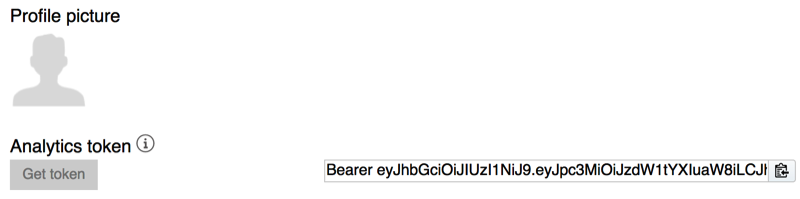
Each user gets his own unique Token. This Token is only valid for the current school period and can be retrieved from the user settings which you can open on the user's name on the top-right-hand side of the screen.
Step 2, configuring the connection in Microsoft PowerBI
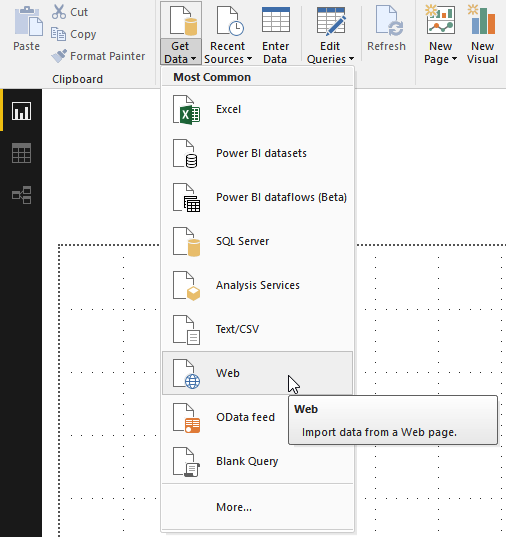
Start PowerBI and then click Get Data . In the dropdown select Web .
A dialogue opens in which you have to choose the advanced settings
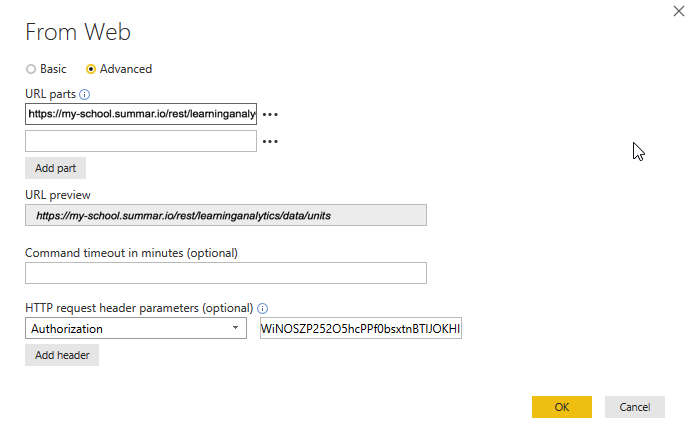
In this dialog you indicate which file you want to access via the URL parts field. In the URL preview field you can see exactly which URL you have typed.
Then you add an HTTP request header parameter . From the drop-down list, select Authorization and paste the Token from step 1 into the field behind it.
With the OK button you establish this configuration and you enter the next configuration screen.
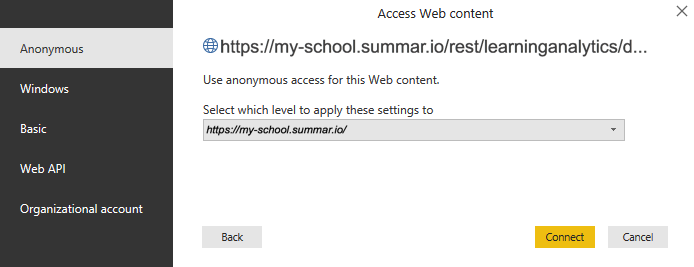
Here you can accept the default configuration and click the Connect button. The connection is made and the result is shown below.
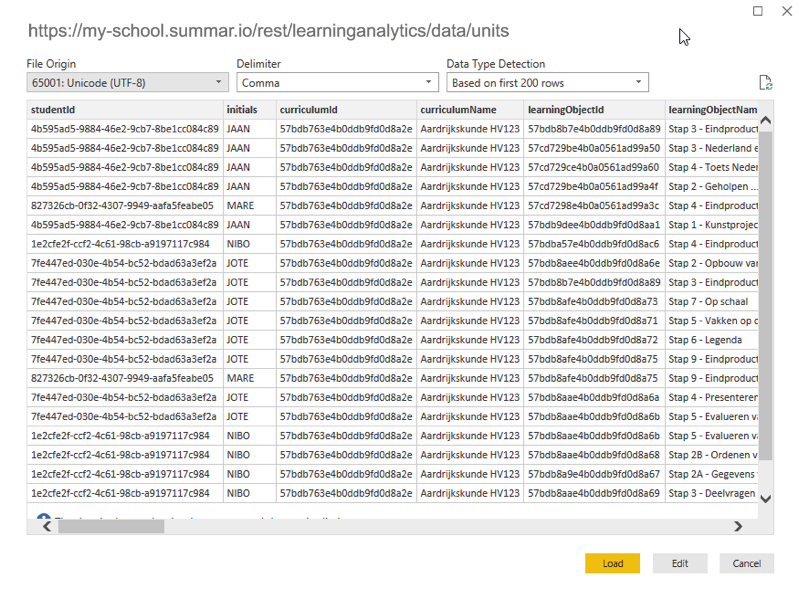
If the information in this screen looks like this, you can load the data for use. You do this by clicking the Load button. The data is then available in the new report to be built.
Related Articles
Teaching with Summar.io 2.6
Congratulations! Your school is going to use Summar.io. Summar.io is an inspiring digital learning environment that gives learners more room to take control of their own learning process. The role of you as a teacher also changes. You get a more ...Learning environment
Learning environment Login This app is the place from which the students work. To get here, the student first has to log in. This can be done in 3 ways: Using a Summar.io local account with an e-mail address and a password; With a Google+ account; ...Learning objects
A LearningObject is "a collection of content items, practice items, and assessment items that are combined based on a single learning objective". Within Summar.io they are designed to be the basic unit of learning material that can be used in ...Provide student id while opening learning material
It is possible to include a student id placeholder in learning material links that refer to an external source. Summar.io then ensures that this placeholder is replaced by the actual student identifier and included in the URL when a student opens ...What does a checkmark in front of a learning objective mean in the Progress app
A checkmark in front of a learning objective means that all students have finished this learning objective; the learning objective is considered completed for all students.