What is the meaning of the colors of parts in the Progress app?
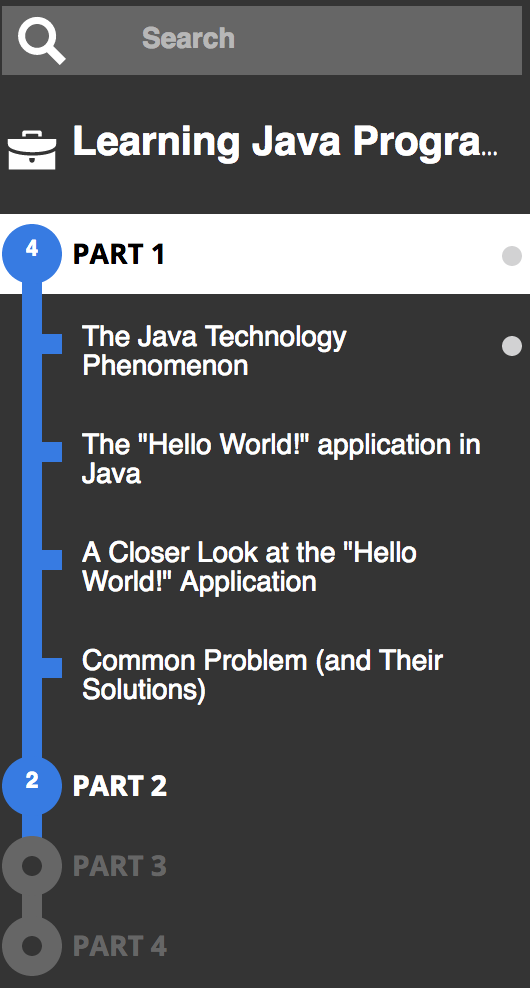
In this example the parts and learning objectives have a blue color. This means that one or more students are working on these parts or the associated learning objectives. On the spheres of the parts a number is displayed. This number indicates how many students are active in this part. In this example, 4 students are active in part 1 and 2 students are active in part 2. If the spheres are grey, like the spheres of part 3 and 4, there are no active students for that part.
The small grey balls indicate where the students are active at the moment.
Related Articles
Progress
The Progress app The Progress app can be used by teachers to monitor and analyze the progress of students. In Summar.io, progress can only be monitored or analyzed for a specific course which has one or more learning lines. In order to use this app, ...What does a checkmark in front of a learning objective mean in the Progress app
A checkmark in front of a learning objective means that all students have finished this learning objective; the learning objective is considered completed for all students.User administration
User administration app Within Summar.io a u ser can have several Roles and each role will provide access to certain apps. Besides the different roles the u ser has one or more e-mail addresses which can be used to log in. To administer all the user ...Recommendation
Recommendation app As a teacher you can create recommendations in Summar.io. Recommendations can be used to optimise the learning lines of individual students by issuing extra homework, or specific remedial material to help a student with a ...Timeline
Timeline app The Timeline app allows Teachers and Mentors to view and analyse the learning activities that were done by a student in the context of a course. Overview 1. Selection panel In this section the teacher determines for which group or ...